Changing your phone does not necessarily mean losing your crypto. In most self-custodial wallets, you can restore access on a new device using your seed phrase or another supported recovery method.
The challenge is having that recovery method available when you need it.
This guide explains how to recover a crypto wallet on a new phone, what you need for traditional wallet recovery, and what happens when your original device or recovery method is no longer available. You'll also see how
Zelf Wallet uses proof-of-humanity to make wallet recovery more flexible and less dependent on a single device.
Here's how it works.
Can You Recover a Crypto Wallet on a New Phone?
Yes. You can usually recover a self-custodial crypto wallet on a new phone as long as you still have its supported recovery method.
Traditional wallets commonly use a 12- or 24-word seed phrase to restore access. Depending on the wallet, recovery may also involve a private key or another supported credential.
Your crypto is not actually stored inside your phone. The assets remain recorded on the blockchain, while your wallet manages the cryptographic keys that allow you to control them.
So replacing your phone does not automatically mean losing your crypto. What you need to recover is access to the wallet, not the assets themselves.
How to Recover a Crypto Wallet on a New Phone
For a traditional self-custody wallet, the process is generally:
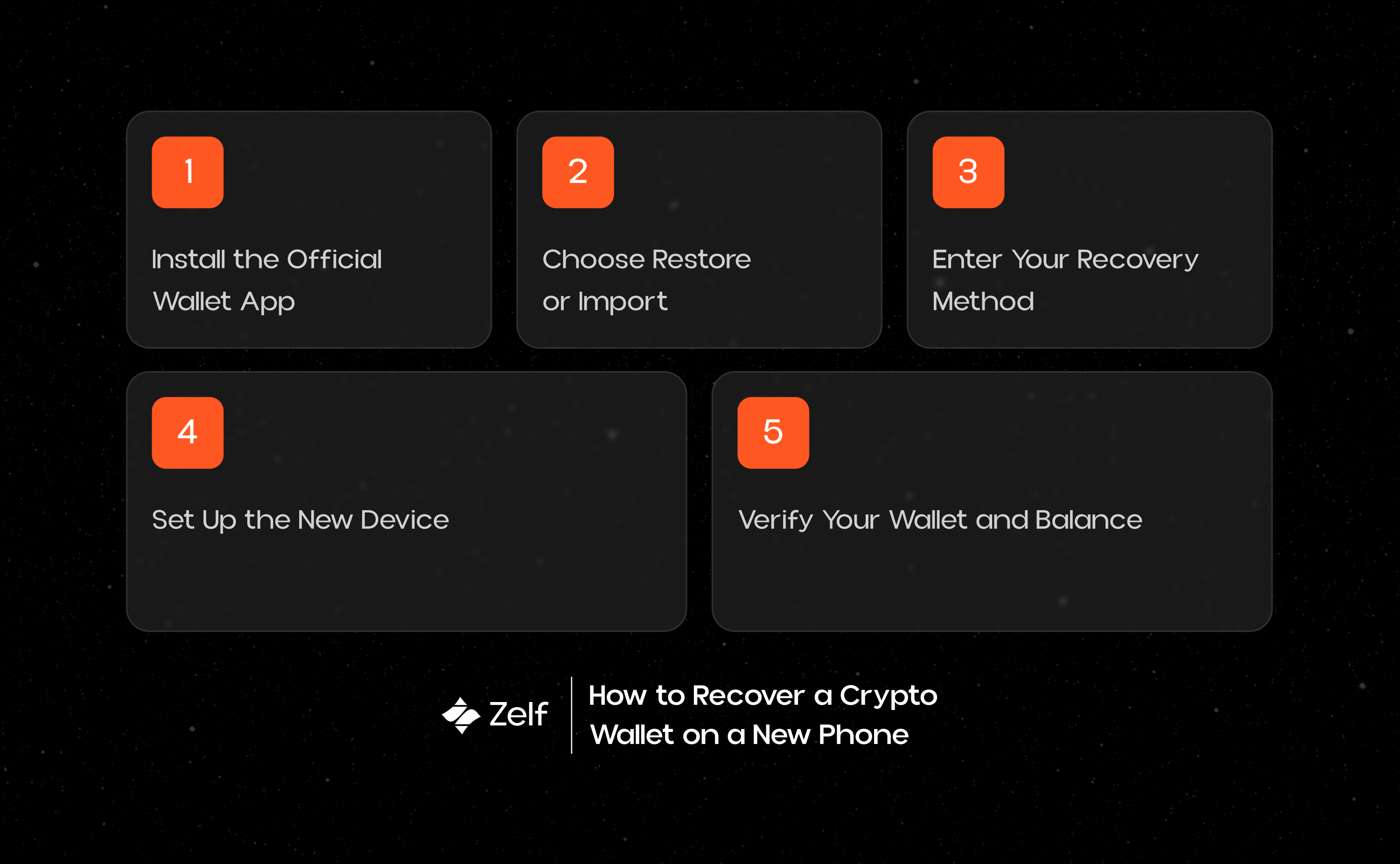
Install the official wallet → choose Restore or Import → enter your recovery method → set up the new device → verify your wallet and balances
1. Install the Official Wallet App
Download the wallet from its official website or the verified App Store or Google Play listing.
Be especially careful during recovery. Fake wallet apps and phishing websites can be designed to capture seed phrases and private keys.
2. Choose Restore or Import
Open the wallet application and look for an option such as:
- Restore Wallet
- Import Wallet
- Recover Existing Wallet
- I Already Have a Wallet
Do not choose Create New Wallet if you are trying to access your existing wallet.
Creating a new wallet generates a new set of cryptographic credentials and will not restore the wallet that was previously on your phone.
3. Enter Your Recovery Method
For most traditional self-custody wallets, this means entering your seed phrase.
Enter every word in its original order and make sure it is spelled correctly.
Your recovery phrase should only be entered into the legitimate wallet application you are intentionally using for recovery. Never enter it into a website, support chat, form, or message.
4. Set Up the New Device
Once the wallet has been restored, the application may ask you to create a new password, PIN, or other security layer.
This protects the wallet installation on the new phone.
It is important to understand that your local password and your wallet's recovery mechanism are not necessarily the same thing. Your password may protect the application on one device, while the recovery credential allows the wallet itself to be restored elsewhere.
5. Verify Your Wallet Address and Balance
After recovery, check that the wallet address is the one you previously used.
Then review your balances and transaction history.
If something appears to be missing, do not immediately assume your crypto is gone. You may be viewing a different account or network, or a token may simply not be visible in the wallet interface.
The key step is to verify the wallet address and make sure you restored the correct account.
6. Restore Additional Accounts or Settings
Depending on the wallet, you may also need to restore or add:
- Additional accounts
- Supported networks
- Custom tokens
- DApp connections
- Other local settings
Not every piece of wallet information is necessarily restored in exactly the same way.
What Do You Need to Recover a Crypto Wallet?
The recovery information depends on the wallet architecture.
Seed Phrase
A seed phrase is the most common recovery method used by traditional self-custody wallets.
It generally consists of 12 or 24 words and can be used to recreate the wallet's underlying cryptographic keys.
Because control of the seed phrase can mean control of the wallet, it must be treated as highly sensitive information.
Private Key
Some wallets allow users to import an individual account using its private key.
A private key can provide control over the associated blockchain address, but it is not always equivalent to restoring an entire wallet. Wallet structures can vary.
Hardware Wallet Recovery
Hardware wallets typically protect private keys through a dedicated device but still rely heavily on a recovery phrase if the physical device is lost or replaced.
This means the hardware device and the recovery phrase serve different roles.
Other Recovery Methods
Newer wallet architectures are exploring alternatives to traditional seed phrases, including biometric authentication, passkeys, social recovery, and other cryptographic recovery models.
The exact method depends on the wallet.
What If You Still Have Your Old Phone?
If your old phone is still working, don't erase it immediately.
First, make sure the wallet has been successfully restored on the new device and that the correct address and balances appear.
You can also use this opportunity to review your recovery setup.
Ask yourself:
If this phone stopped working tomorrow, could I still access my wallet?
If the answer depends entirely on the phone, your wallet may have a single point of failure.
Traditional self-custody solves this by separating wallet access from the physical device through a seed phrase or private-key backup. But that creates another responsibility: the backup itself must be protected.
This is one of the limitations that modern wallet architectures are beginning to address.
What If You Lost Your Old Phone?
Losing your phone does not automatically mean losing your crypto.
If you still have the wallet's valid recovery method, you can generally restore access on another compatible device.
The phone is simply the device used to interact with the wallet. The assets themselves remain on the blockchain.
However, if the phone was stolen or compromised, you should also consider whether your wallet credentials may have been exposed.
What If You Lost Your Phone and Your Seed Phrase?
This is where traditional self-custody becomes much more difficult.
If your old phone is gone and you also no longer have your seed phrase, private key, or another valid recovery method, you may not be able to regain access to the wallet.
The blockchain can continue to show the assets associated with your wallet address, but it does not provide a replacement private key.
This is one of the fundamental tradeoffs of traditional self-custody:
You control your assets, but you are also responsible for protecting your recovery mechanism.
How Does Zelf Wallet Recover on a New Phone?
Zelf Wallet takes a different approach to wallet recovery by using HumanAuthn and a portable, encrypted Zelf QR instead of making a traditional seed phrase the center of the recovery experience.
HumanAuthn provides proof-of-humanity through live facial biometric verification. It runs on-device and uses the verified biometric signal to reconstruct the cryptographic material needed to access the user's Zelf ID.
The private material is wrapped inside the encrypted Zelf QR. It is verifiable, non-biometric, and portable, and the Zelf ID is not stored on any server.
Because the Zelf QR remains encrypted, it can be stored separately from your phone, including as a physical backup, in a photo gallery, or through decentralized storage such as IPFS. The stored credential does not expose usable private keys or biometric data.
How the Recovery Process Works:
When you need to recover your wallet on a new phone, the process is:
Get a compatible device → retrieve your Zelf QR → verify your face through HumanAuthn → access your Zelf ID → restore wallet access
A successful HumanAuthn verification reconstructs the ephemeral cryptographic key material required to decrypt the Zelf QR Code and restore access to the wallet.
The important difference is that the recovery credential does not have to remain on the original device. The encrypted Zelf QR Code can be stored separately and retrieved when needed.
Why Does Device-Independent Recovery Matter?
Phones can be lost, damaged, stolen, upgraded, or replaced.
Traditional wallets address this by giving users a separate recovery phrase. But that phrase becomes another thing that must be stored, protected, and kept available.
Zelf Wallet is designed to make wallet access device independent. Your Zelf QR can be stored separately from your primary device, while HumanAuthn verifies your identity through live facial biometrics when you need to recover your wallet.
The result is a recovery model built around human presence rather than dependence on one particular device.
Conclusion
Recovering a crypto wallet on a new phone is usually straightforward when you still have the appropriate recovery method.
Traditional self-custody wallets generally rely on seed phrases or private keys. These methods give users control over their assets, but they also make the user responsible for protecting the recovery mechanism.
Losing a phone does not necessarily mean losing your crypto. Losing the phone and the recovery method can be much more serious.
Modern wallet architectures are beginning to rethink this model.
Zelf Wallet uses HumanAuthn and a biometric root of trust to support device-independent wallet recovery. Instead of relying on a traditional seed phrase, users can recover their wallet on a compatible device using their face and their portable Zelf QR.
Recover Your Wallet Without Being Tied to One Device
Your wallet should not become inaccessible simply because your phone changes.
Zelf Wallet combines face-based authentication, encrypted key protection, and device-independent recovery to make self-custody easier to manage.
Try
Zelf Wallet today and experience a smarter way to secure your crypto!